


SumTotal Next
0.00.00 Reviews
App Specs
- Version
- 3.4
- Updated On
- License
- Free
- Downloads
- 50,000+
- Developer
- SumTotal Systems LLC
- Categories
- Business
- Platform
- Android
Screenshots
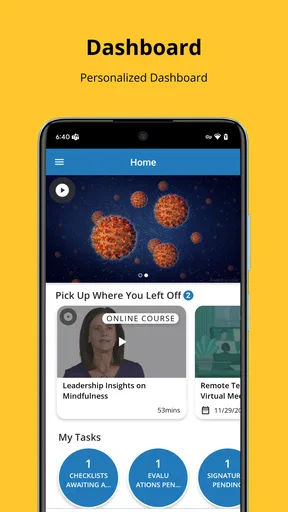
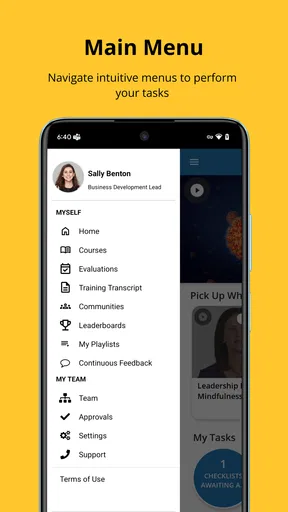
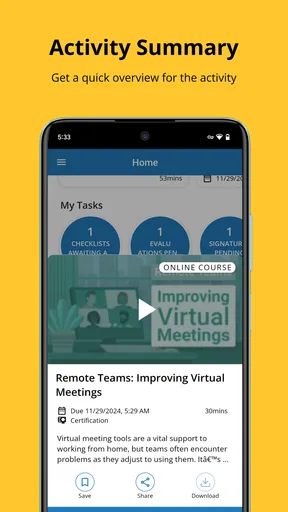
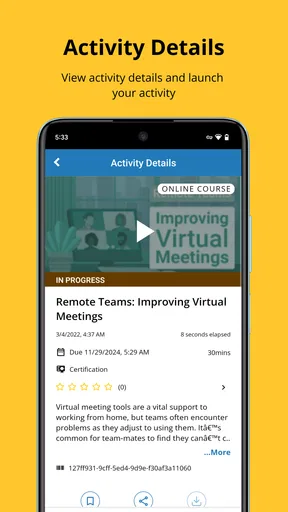
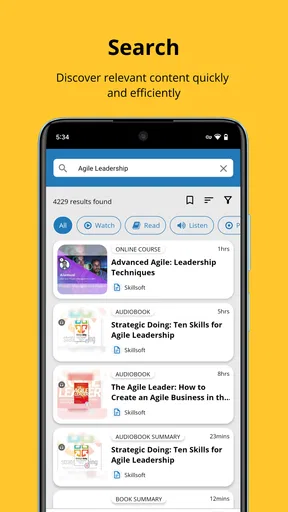
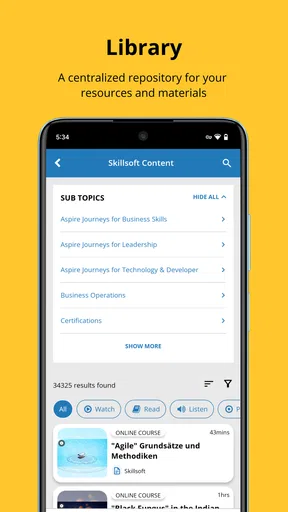
 Analysis by AppCompare
When I open a business app, I want to understand where to go before I start thinking about the task itself. That is the main promise I noticed with SumTotal Next: it presents SumTotal’s work environment in a more approachable way, with navigation that feels less like a maze. I reviewed it as a practical tool for people who need to reach workplace information or learning-related tasks without spending unnecessary time searching through menus.
The app is developed by SumTotal Systems LLC and is available free of charge for everyone. It belongs to the business category, supports devices running Android or iOS version 12 or later, and its current release is version 3.4. The store listing shows over 50 thousand installs, which gives it a modest but meaningful footprint among workplace users. It was released on September 21, 2025, so I see it as a relatively fresh mobile entry rather than a long-established consumer app.
From opening the app to completing a workplace task
I find it helpful to judge a workplace app by the whole path from a reminder to a finished task, rather than by its opening screen alone. Here I’ll focus on how SumTotal Next fits into that routine and where a clearer route can save effort without replacing the organization’s own process. That distinction matters especially when several people share a device or coordinate around the same workplace system.
The starting condition: a work task waiting somewhere in the system
The most realistic way to judge this app is not by opening it with nothing to do, but by imagining the situation it is designed for. I might be away from my desk, receive a reminder about a required course, need to check an item connected with my professional development, or simply want to reach a workplace resource from my phone. In that situation, the important question is not whether the app looks exciting. It is whether I can identify the right path quickly.
That is where the simplified navigation matters. SumTotal Next is not trying to be a general-purpose notes app, personal planner, or team chat replacement. Its value depends on how efficiently it connects me to the SumTotal environment already used by my organization. If my employer relies on that environment, the app can act as a more convenient mobile doorway. If my workplace uses an unrelated platform, installing it will not magically create a useful workflow.
I also appreciate that the audience is broad enough to include ordinary employees, managers, and people responsible for workplace learning. The Everyone age rating reflects that it is a professional utility rather than an app built around mature entertainment or sensitive themes. Still, the practical experience will depend heavily on the account and services connected to the organization using it.
First steps: getting oriented instead of hunting through menus
My first test with a navigation-focused app is simple: after opening it, can I tell what the next useful action is? SumTotal Next makes its case through a cleaner interface and a more direct route into the available work areas. That sounds like a small improvement, but it changes the mood of the entire session. A complicated business system can turn a quick check into an administrative chore; a clearer entry point makes the same task feel manageable.
Worth Reading Before You Choose

Flipboard Shows What News Apps Must Do Beyond the Feed

Switching to Android Auto Means Rethinking Your Driving Routine

Google Calendar Makes a Crowded Week Easier to Manage

Ludo King Makes the Most of the Minutes Between Plans

Baby Panda World Brings Quick Play to Modern Phones, but Its Game Library Feels Busy

ESPN’s Live Game View Makes Following Close Games Easier
I would approach the first session with a specific goal rather than tapping around randomly. For example, I would decide whether I am trying to continue a learning activity, inspect something assigned to me, or review information connected with my work. This habit is especially useful because enterprise apps can expose different options depending on the account. A focused starting point makes it easier to distinguish a missing feature from a feature that is simply located elsewhere.
The strongest practical benefit is reduced orientation time, not extra entertainment or personal customization. That distinction is important. Someone expecting a polished consumer dashboard with endless personalization may find the experience restrained. Someone who wants a straightforward route into a workplace system is more likely to appreciate the design choice.
The step-by-step flow: turning a reminder into action
Consider a normal weekday. I am commuting or taking a short break when I remember that I need to deal with a workplace learning item. Instead of waiting until I return to a computer, I open the app and look for the relevant area. The improved navigation should help me move from the home screen toward the task without repeatedly backing out of unrelated sections.
Once I locate the appropriate destination, I would check the context before acting. Is this something assigned to me? Is it a resource I need to consult? Is it an item that requires completion rather than simple viewing? That extra pause is worthwhile because workplace systems often contain similar-looking entries with different consequences. The app can make the route clearer, but I still need to read the labels carefully and confirm that I am working on the correct item.
This is one of the less obvious ways to use the app well: treat its navigation as a decision aid, not as a substitute for checking details. A simplified interface reduces the number of wrong turns, but it does not remove the need to verify the task. I would avoid rushing through a required activity simply because the path to it is now easier to find.
For a manager, the same flow may begin with a different question. Instead of asking, “What do I need to complete?” the manager may need to locate an area related to a team member or a workplace development process. The app’s usefulness then depends on whether the organization has enabled the relevant role-based access. The interface can guide me toward available sections, but it cannot grant access that my account does not have.
Handoffs: where the phone meets the wider workplace system
Business apps are rarely self-contained. The important handoff in this case is between my phone and the organization’s SumTotal setup. The mobile interface is the front door, while the actual work context comes from the account, assignments, and content configured by the employer. That means the app should be judged as part of a larger workflow rather than as an independent productivity tool.
This has a useful consequence. I do not need to rebuild my workplace information manually inside the app. If the organization has configured the environment correctly, the mobile experience should lead me toward the same work-related context I would normally seek elsewhere. The trade-off is that I have less control over what appears. The app is convenient precisely because it reflects an existing business structure, not because it lets me design an entirely separate personal system.
The handoff can also involve another person. A learner may complete an activity that a supervisor expects to see. A manager may need to follow up on an employee’s progress. In both cases, the mobile app is only one point in the chain. I would not assume that opening a page or reading an item automatically communicates an outcome to a colleague. The safe approach is to look for the action’s actual completion state and follow the organization’s normal process when a human follow-up is required.
This is a key limitation compared with a simple personal checklist. In a checklist, I control the whole workflow. In SumTotal Next, the result may depend on account permissions, organizational setup, and what the connected system recognizes as a completed action. That makes it more suitable for structured workplace processes, but less flexible for informal personal planning.
What the result feels like after the handoff
When the flow works, the result is modest but valuable: I reach the relevant workplace destination with less friction and can return to my day. I do not need the app to inspire me. I need it to remove the small barriers that make business software tiring on a phone. The cleaner interface helps most when I already know roughly what I need and want a direct route to it.
In an everyday scenario, I might use a short break to check an assigned learning item, review the information attached to it, and leave with a clear understanding of the next step. The benefit is not simply saving taps. It is reducing uncertainty. I spend less time wondering whether I am in the correct part of the system and more time dealing with the actual work.
Another useful scenario is preparation before a meeting. If I need to refresh myself on a workplace topic, a mobile entry point can be more practical than waiting until I have access to a full computer. I would use it for a targeted review, not for replacing every desktop interaction. The phone is best when speed and availability matter; the larger screen is usually better when I need to compare several pieces of information or work for a long period.
That distinction gives SumTotal Next a realistic place in my routine. I see it as a companion for access and follow-through, not necessarily the best environment for extended administration. The more complex the task becomes, the more important it is to consider whether a browser or desktop view would offer better visibility.
Where the flow breaks: the limits behind the clean interface
The first possible break is organizational rather than visual. If my employer has not connected the relevant services, assigned the right content, or granted the necessary role permissions, the app may feel empty or less useful than expected. A smoother interface cannot solve a configuration problem. Before blaming the app, I would check whether the issue affects my account specifically and ask the organization’s support contact if the expected work area is missing.
The second break is expectation. The phrase “simplified navigation” does not mean that every business process becomes simple. Workplace learning and administration can still involve several stages, terminology, and approval paths. The app may help me reach those stages, but it cannot make an unclear internal policy clear. I still need to understand what my organization expects me to do after opening an item.
A third limitation is the phone format itself. Even with a better interface, a smaller screen can make detailed reading, comparison, or extended data entry less comfortable. I would choose the mobile app for quick checks, short sessions, and tasks that benefit from immediate access. I would switch to the usual desktop or browser alternative when I need a broader view, expect to work for a long time, or must carefully compare multiple records.
There is also a practical compatibility checkpoint: the app requires Android or iOS version 12 or later. That is not a problem for many current devices, but it matters if I am trying to use an older phone maintained by an employer. Checking the operating system before planning a rollout can prevent a frustrating installation surprise.
How it compares with ordinary business-app alternatives
Compared with a general mobile browser, SumTotal Next offers a more focused doorway into the SumTotal environment. A browser can be more versatile, especially when I need to access unrelated company tools in the same session. However, that flexibility often means more searching, more pages to manage, and a less consistent mobile path. I would choose the app when my work is centered on the SumTotal system and I want a dedicated route.
Compared with a personal task manager, the difference is even clearer. A task manager is better for collecting reminders from many parts of my life, adding private notes, and building a workflow around my own preferences. SumTotal Next is better when the task belongs to an organization and must remain connected to that organization’s structure. I would not replace my personal planner with it, and I would not expect it to replace a workplace learning platform either.
Compared with a full desktop enterprise interface, the mobile app’s advantage is convenience, while the desktop’s advantage is depth and screen space. The choice is not really about which one is universally better. I would use the phone for a quick handoff, a focused review, or checking what needs attention, then move to the larger interface when the work becomes detailed or administrative.
Who should use it and who should skip it
I would recommend SumTotal Next to employees whose organizations already use SumTotal and who regularly need mobile access to workplace learning or related business tasks. It is also worth considering for managers who need a quicker way to reach role-specific areas while away from a desk, provided their organization has configured those areas for mobile use.
I would be more cautious if I rarely use workplace systems from a phone. In that case, the app may not add enough value to justify another icon and another place to remember. I would also skip it as a general productivity download. It is not the right choice for personal project management, casual note-taking, team messaging, or organizing unrelated appointments.
Organizations evaluating it should focus on workflow fit rather than appearance alone. The important questions are whether employees need mobile access, whether the existing SumTotal setup supports their roles, and whether the simpler route reduces support requests. A clean interface is helpful, but the real return comes from making a recurring business action easier to start and finish.
My practical verdict after following the complete workflow
SumTotal Next succeeds when I treat it as a focused mobile access point: start with a known workplace need, use the clearer navigation to find the appropriate area, confirm the task details, complete the available action, and let the result flow back into the organization’s normal process. That complete path is more important than any individual screen.
I like the direction because business software often loses users before they reach the useful part. A more intuitive interface can make a genuine difference during short sessions, especially when I am away from a desk and only need to handle one clearly defined item. The app’s free price also removes a direct cost barrier for individual users, although the broader usefulness still depends on the workplace environment behind it.
My reservation is that the app cannot remove every source of friction. Account setup, role access, organizational terminology, and the limits of a phone screen remain part of the experience. For complex work, I would still prefer the usual desktop or browser alternative. But for employees who already belong to a SumTotal-based workplace, I see SumTotal Next as a sensible companion that makes the first steps less confusing and everyday mobile access more practical.
Pros
- Centralizes learning
- compliance
- and performance information in one app.
- Useful for employees who need access to training while away from a computer.
- Course reminders can help users keep required learning on schedule.
- Supports organizations with structured
- role-based learning programs.
- A familiar mobile companion for companies already using SumTotal systems.
Cons
- The experience depends heavily on how the employer configures SumTotal.
- Some features may require a stable connection or desktop access.
- Navigation can feel less intuitive for first-time users.
- Performance may vary across devices and organizational setups.
- Not useful as a standalone learning app without an employer account.
FAQs for SumTotal Next
What is SumTotal Next used for?
SumTotal Next is a mobile companion for organizations using the SumTotal talent and learning management platform. Depending on your employer’s configuration, it may let you access assigned courses, review learning materials, complete training activities, check progress, and receive updates while away from a computer. The exact tools available can vary considerably because administrators control the enabled features and content.
Can I use SumTotal Next without a company or school account?
Usually, no. SumTotal Next is primarily designed for employees, students, or members whose organization already uses SumTotal. You generally need valid sign-in details supplied by your employer, institution, or system administrator, and the organization may also require a specific server address or authentication method. Downloading the app alone does not normally create an independent account or provide access to public courses.
Does SumTotal Next work offline?
Offline availability depends on the course type, administrator settings, and the version of the app. Some learning materials may be available for temporary offline viewing after they have been downloaded, but interactive activities, assessments, synchronization, and certain media usually require an internet connection. Before relying on offline access, open the relevant course while connected and verify which content is actually supported.
Is SumTotal Next free to download and use?
The application may be available to download without an upfront charge, but access to its learning environment is normally provided through an organization’s SumTotal subscription or license. Your employer or institution may pay for the platform, while some courses or services could be subject to internal policies. Check with your administrator about eligibility, data charges, and any costs associated with mobile internet usage.
What should I do if I cannot sign in or my courses are missing?
First, confirm that your internet connection is working and that you are using the correct organization details, username, password, and sign-in method. If your company uses single sign-on, complete the login through the approved portal rather than creating a separate password. Missing courses, locked content, expired assignments, and account problems are usually controlled by administrators, so contact your organization’s help desk if basic troubleshooting does not resolve the issue.


